


Welcome to Algebra II
How to access Canvas course
1. Enter the URL you received
Once you enroll, you will receive the URL to enroll in your canvas course.
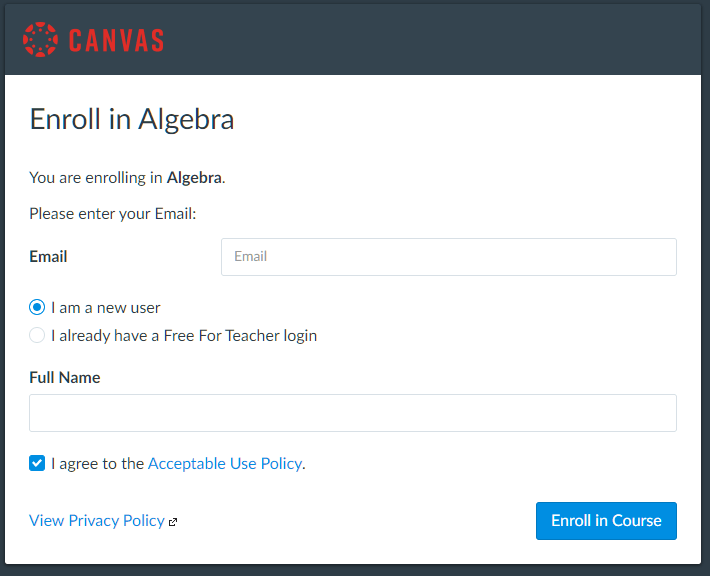
2. Enter your information
Enter Your Email and Full Name and click the Enroll in Course button.
3. Start accessing your course
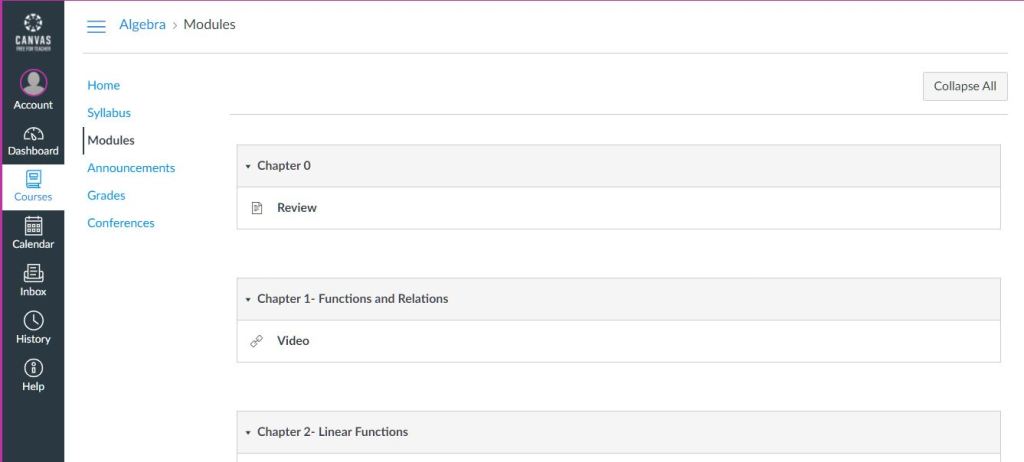
You are ready to access your course from the Canvas Dashboard from Modules .
How to work through each chapter in Canvas
- Read Chapter Objectives and Learning Outcomes.
- Select the first section in the Chapter.
- Watch the Lesson video(s) for each topic and pen down important points. Watch the Examples Videos and take notes.
- Work on exercises associated with the section.
- Review all concepts of the module by reviewing your notes and material posted.
- Take the Module Quiz.
Objectives
This is a quote block with a short quote.
This is the citation.
Student learning outcomes
This is a paragraph block with a drop cap. Use the Settings panel to change block settings.
About the Instructor
Visitors will want to know who is on the other side of the page. Use this space to write about your business.
 AI that thinks in Mathematics
You must be logged in to post a comment.